
iOS 27 brings practical upgrades to older iPhones despite AI limitations
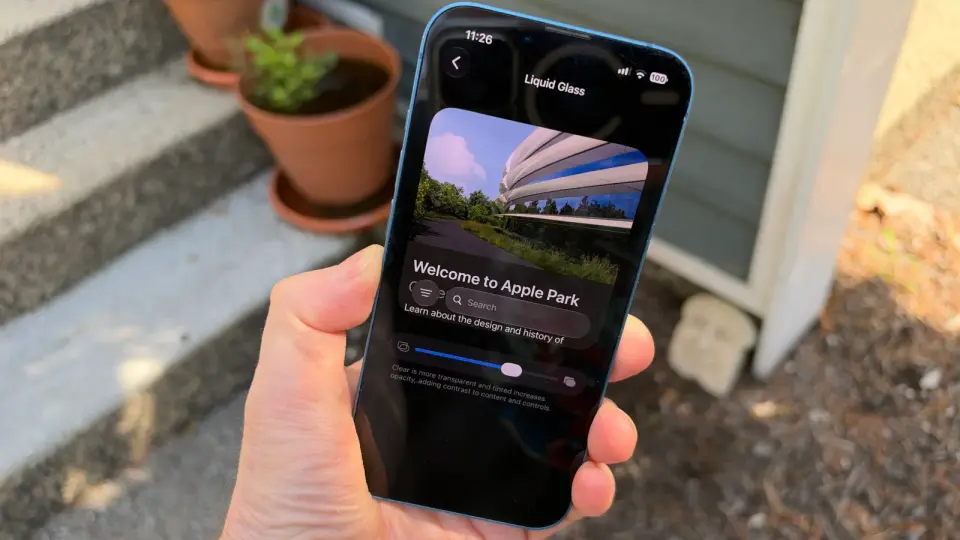
iOS 27 introduces seven key features for older iPhones, including customizable Liquid Glass, pinned camera controls, and improved Wi-Fi transitions, while Siri AI remains exclusive to newer models.
Key points
- iOS 27 supports devices from the iPhone 11 and SE onward, offering features without requiring Apple Intelligence.
- Users can now customize the Liquid Glass visual effect using a slider in Settings to adjust translucency.
- The Camera app allows users to pin favorite controls for quicker access across different shooting modes.
- Photos app updates include saving video frames as stills and customizing slideshow transitions and music.
- Messages app now supports creating and sending drawings directly within conversations.
- Calendar events display time zones instead of specific cities, improving accuracy for scheduling.
Background
Apple previously released iOS 26.7 as a security-focused update for users not ready for the major iOS 27 changes. iOS 27 was initially highlighted for its Siri AI and Apple Intelligence features, which required significant storage and newer hardware. This update expands functionality to older devices, building on the release candidate builds that introduced these core AI capabilities.
How outlets are covering it
ZDNET emphasizes the practical benefits of iOS 27 for older iPhone users, highlighting seven specific features that do not require Apple Intelligence. In contrast, 9to5Mac focuses on the qualitative improvements of Siri AI, noting that it avoids the human-like persona of competitors like ChatGPT and Gemini. While ZDNET targets users with older devices, 9to5Mac addresses the broader AI assistant experience, suggesting that Siri's straightforward approach is a significant advantage over other AI tools.
Why it matters
iOS 27 ensures that older iPhone users receive meaningful updates, extending the lifespan of their devices with practical features. The distinction between AI-dependent and non-AI features allows users to make informed decisions about upgrading, balancing new capabilities with hardware limitations.
What to watch
Users should check for iOS 27 updates via Settings > General > Software Update. Those with older devices can enjoy the new features without needing Apple Intelligence, while newer users can explore the enhanced Siri AI capabilities.
- 7 iOS 27 features that make old iPhones exciting again (no Apple Intelligence needed) ZDNET
- Your iPhone has a Siri AI kill switch. Here’s how to use it Fast Company
- iOS 27’s Siri gets one thing very right that other AI assistants get wrong 9to5Mac
- With iOS 27, Apple Is Quietly Setting the Stage to Paywall Your iPhone pcmag.com
- 5 hidden iOS 27 upgrades that make a big difference – and why I love them ZDNET
Want the full story? Read the original reporting
Read on ZDNET