
iOS 27 Unlocks Minimalist Lock Screens and AI-Generated Wallpapers
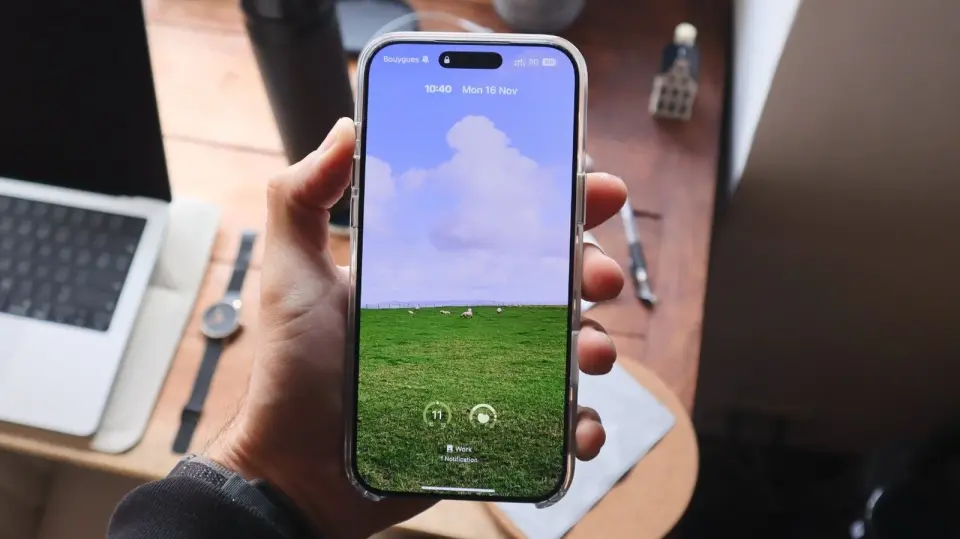
Apple’s iOS 27 update introduces significant new customization options for the iPhone Lock Screen, including AI-driven image extension, a smaller clock aesthetic, and AI-generated wallpapers. Users can also remove the Now Playing card for a minimalist look and leverage Focus Modes for context-aware screen changes.
Key points
- iOS 27 allows users to extend landscape wallpapers using on-device AI to fit the vertical Lock Screen format.
- A new feature enables users to shrink the Lock Screen clock into the date area for a minimal design.
- Apple Intelligence features include generating custom wallpapers via text prompts or existing photos using Image Playground.
- Users can now remove the Now Playing card from the Lock Screen while audio continues to play.
- Focus Modes can trigger based on location, time, or activity, changing wallpapers and notification filters automatically.
Background
Apple’s approach to iPhone customization has evolved significantly since iOS 18, which first introduced extensive widget and font options for the Lock Screen, Home Screen, and Control Center. The subsequent iOS 26 update introduced the Liquid Glass design language, while 2026 updates added animated album covers and expanded Live Activities in the Dynamic Island. The current iOS 27 release, paired with the new Siri AI, continues this trend of deep personalization.
Why it matters
These updates shift the iPhone from a standardized interface to a highly personalized experience, allowing users to tailor their device’s appearance and functionality to specific contexts, such as work, commuting, or leisure, without relying on third-party apps.
What to watch
Users should explore the new Image Playground and clock resizing options in iOS 27 settings. Apple may further integrate AI-driven customization into other system interfaces in future updates, potentially expanding the scope of dynamic, context-aware design.
Want the full story? Read the original reporting
Read on BGR