
Windows 11 KB5132057 Delivers Redesigned Search and Faster File Explorer
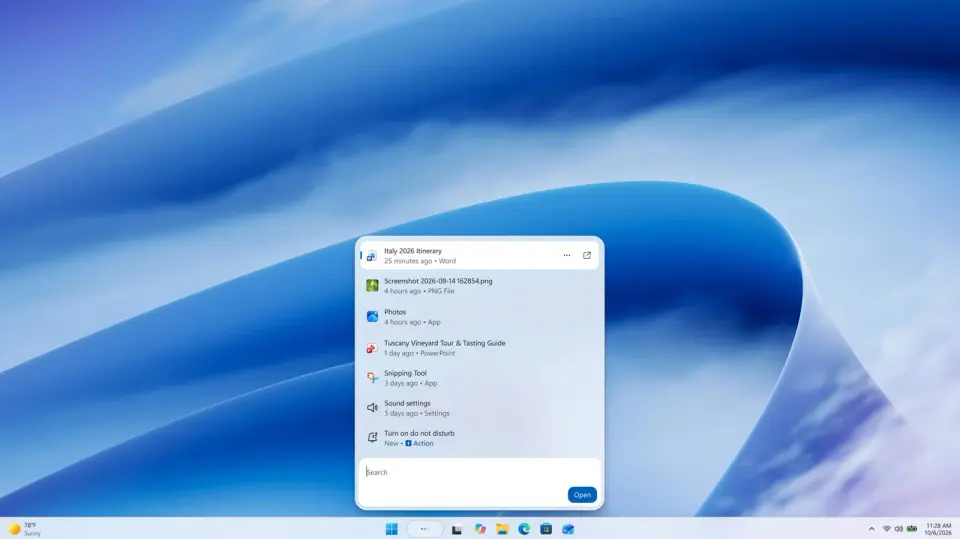
Microsoft released the November 2026 optional update KB5132057 for Windows 11, introducing a redesigned Search interface built on WinUI 3. The update features inline actions for system settings, improved typo handling, and faster File Explorer searches via indexing. It also includes a modernized Run dialog and enhanced Windows Hello facial recognition in low light. The rollout is gradual, with initial availability in English.
Key points
- KB5132057 is the final non-security preview update for 2026, rolling out gradually to Windows 11 25H2 and 26H2.
- The new Search interface uses WinUI 3 for better speed and memory efficiency, replacing the old preview pane with a single list.
- Users can now perform inline actions like toggling dark mode or Bluetooth directly from Search without opening Settings.
- File Explorer searches from 'This PC' now use the Windows indexer, significantly improving speed and consistency.
- Windows Hello now automatically brightens the screen to improve facial recognition in dim environments.
- The update integrates Copilot answers into Search and supports Phone Link actions for Android devices.
Background
Microsoft has been testing these changes in Insider builds since late 2025 and early 2026. Previous updates in July 2026 removed ads from Search, and November 2026 preview builds introduced the actionable search interface and faster indexing. This update marks the final non-security preview release for the year before normal servicing resumes in January 2027.
How outlets are covering it
TechPowerUp highlights the performance gains from WinUI 3 and the convenience of inline commands, while noting the gradual rollout. BleepingComputer emphasizes the technical details, such as the 94ms load time for the new Run dialog and the specific build numbers (26300.10075 and 26200.10075). Windows Central focuses on the broader ecosystem of 18 new features, praising the Search improvements but noting inconsistencies across preview builds. Wccftech reports on user feedback from Reddit, where users praised the dramatic speed improvement in File Explorer but questioned if it merely extended existing indexing. Community reactions are mixed, with some users criticizing the forced integration of Copilot and web searches, while others acknowledge the tangible improvements in local file search and system responsiveness.
Why it matters
This update addresses long-standing complaints about Windows Search performance and usability. By moving to WinUI 3 and integrating actionable commands, Microsoft aims to reduce the need for users to navigate through Settings. The improved indexing in File Explorer could significantly enhance productivity for users managing large file libraries. However, the forced integration of AI features and web results may continue to frustrate users seeking a purely local search experience.
What to watch
Microsoft will resume normal monthly servicing in January 2027. The new Search experience is expected to expand to more languages and receive further refinements, including fixes for interface positioning issues. Users should monitor their Windows Update settings for the gradual rollout of these features, as not all devices will receive them simultaneously.
- New Windows Search Finally Arrives in Windows 11 Update TechPowerUp
- Windows 11 KB5132057 update released with 28 changes and fixes BleepingComputer
- I tested 18 upcoming Windows 11 features. Here’s what I’d actually want on my PC. Windows Central
- Windows 11 KB5132057 Makes File Explorer Search Dramatically Faster, User Reports, As Microsoft Rolls Out Major Improvements Wccftech
- Microsoft's last non-security preview of 2026 packs a punch The Register
Want the full story? Read the original reporting
Read on TechPowerUp