
Windows 11 26H2 Delivers Unannounced Performance Gains via Low Latency Profile
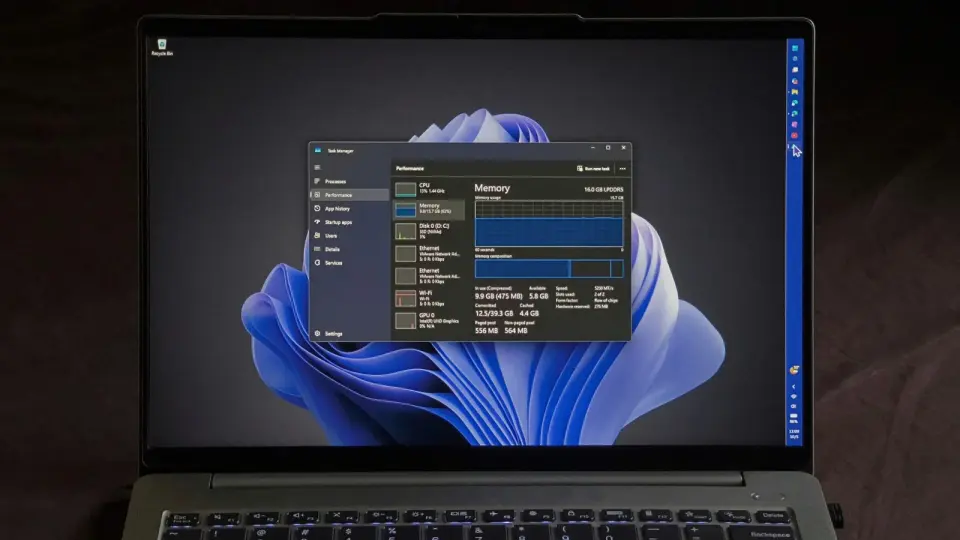
Windows 11 version 26H2 has been released as a lightweight enablement package, activating features previously delivered through monthly updates. While Microsoft did not explicitly list performance improvements in its release notes, users report significant reductions in RAM usage and faster app launch times. These gains are attributed to the 'Low Latency Profile' feature, which optimizes CPU frequency for shell and application interactions, alongside broader memory management optimizations that have been rolling out gradually since mid-2026.
Key points
- 26H2 is an enablement package for devices running 24H2 or 25H2, requiring only a small download and one restart to install.
- The update activates features already present in the codebase, including the 'Low Latency Profile,' which boosts CPU frequency briefly for Start menu, Search, and app launches to reduce perceived lag.
- Users report RAM usage dropping by up to 2GB on 16GB systems after installing 26H2, with memory utilization staying below 90% during heavy multitasking scenarios.
- Microsoft’s controlled rollout means some devices may not receive the update immediately, and features like the movable taskbar and Bing-free search are now enabled by default for many users.
- The update resets the support lifecycle, extending security updates until October 2028 for consumer editions and October 2029 for enterprise versions.
Background
Microsoft has been working on Windows 11 performance and memory optimization throughout 2026, with specific priorities set in July for devices with 8GB or more RAM. Previous coverage indicated that 26H2 was expected to be a minor update with limited new features, focusing instead on enabling previously delivered changes. The current release follows a pattern of staggered rollouts, where many users had to manually enable features via tools like ViVeTool before the official update arrived.
How outlets are covering it
Windows Latest emphasizes the tangible performance benefits, particularly the drop in RAM usage and the impact of the Low Latency Profile, noting that Microsoft did not officially credit these improvements in the 26H2 release notes. PCMag focuses on the user-facing feature activations, such as the movable taskbar and the option to disable Bing search, framing the update as a catch-up for devices missed by the staggered rollout. Microsoft’s official blog highlights the streamlined update experience and security improvements, without explicitly mentioning the performance gains reported by users. Windows Central’s coverage is largely promotional and does not provide substantive analysis of the update’s technical impact.
Why it matters
The 26H2 update demonstrates Microsoft’s shift toward continuous, incremental improvements rather than major annual overhauls. The unannounced performance gains suggest that Microsoft is prioritizing efficiency and responsiveness, particularly for lower-spec devices, in response to rising memory costs and user feedback. This approach may set the stage for future updates that focus on optimization rather than new features, potentially extending the lifespan of existing hardware.
What to watch
Microsoft is expected to discuss further memory optimizations and performance improvements at an event on October 7, 2026. Users should monitor Windows Update for the 26H2 rollout, which may take several weeks due to controlled feature deployment. Future updates, potentially including a 27H2 release in 2027, are expected to build on the current servicing branch, with continued focus on performance and security.
- Windows 11 26H2 quietly shipped with a major performance boost, and here’s why Windows Latest
- How to get the Windows 11 2026 Update Windows Blog
- Windows 11 version 27H2: Everything we know so far Windows Central
- Skip the Wait. Microsoft's 26H2 Update Fixes the Parts You Hate Most About Windows 11 PCMag
- Microsoft promised a better Windows 11. Here’s its 6-month report card PCWorld
Want the full story? Read the original reporting
Read on Windows Latest