
Windows 11 September Update Enables Taskbar Positioning and Start Menu Resizing
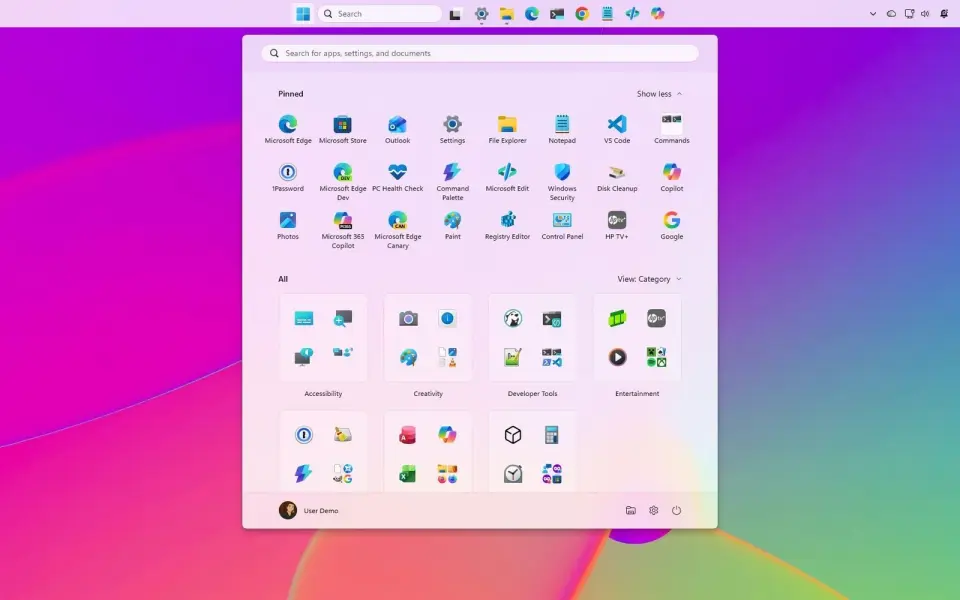
Microsoft’s September 2026 update introduces significant customization options for Windows 11, allowing users to reposition the Taskbar, resize the Start menu, and disable web search results. These changes, part of the 'Windows K2' initiative, are rolling out gradually to improve desktop flexibility and performance.
Key points
- The September 2026 update allows users to move the Taskbar to the top, bottom, left, or right of the screen via Settings.
- Users can now adjust the size of the Start menu and hide their profile name and picture from the interface.
- The update includes an option to disable web results from Windows Search, reducing intrusive suggestions.
- Microsoft is rolling out these features gradually, meaning not all devices will receive them immediately.
- These changes are part of the broader 'Windows K2' effort to make the desktop more customizable and responsive.
Background
This update follows earlier Insider releases in 2026 that focused on refining the Windows 11 experience. In July, Microsoft tested a cleaner Search interface that removed promotional clutter. In August, a redesigned right-click menu was introduced to address sluggish performance and clutter. The current September update builds on these efforts by expanding customization controls for core desktop elements like the Taskbar and Start menu.
How outlets are covering it
Windows Central highlights the new Taskbar positioning and Start menu resizing as key improvements that make the OS feel faster and more personal. The outlet notes a potential issue where docking the Taskbar on the left also shifts the Notification Center, which some users may find undesirable. Windows Blog focuses on the technical rollout, detailing new Insider builds for the Beta and Experimental channels, including a modernized AutoPlay experience and a new accessibility setting to open apps maximized. ExtremeTech emphasizes the customizable right-click menu, which allows users to toggle specific commands and app extensions, aiming for a more predictable and responsive experience. While all sources agree on the theme of increased customization, Windows Central focuses on visual layout changes, Windows Blog on system stability and accessibility, and ExtremeTech on menu efficiency.
Why it matters
These updates signal Microsoft’s commitment to addressing long-standing user complaints about Windows 11’s lack of flexibility. By allowing users to reposition the Taskbar and customize the Start menu, Microsoft is moving away from a rigid, one-size-fits-all approach. This could improve productivity and user satisfaction, particularly for those who prefer a more personalized or less cluttered desktop experience. The gradual rollout suggests Microsoft is testing these features carefully to ensure stability before a wider release.
What to watch
Microsoft is expected to continue rolling out these features gradually to more devices in the coming weeks. Users should monitor their Windows Update settings for the September 2026 update. Further refinements to the Taskbar, Start menu, and right-click menu may be introduced based on Insider feedback. Microsoft has not announced a specific public release date for all these changes, but they are likely to become standard in future Windows 11 updates.
- 3 Windows 11 tweaks you’ll want to change after the September update Windows Central
- Announcing new builds for 21 August 2026 Windows Blog
- Microsoft Tests a Faster, Customizable Right-Click Menu in Windows 11 extremetech.com
- Microsoft finally seems to understand what Windows 11 got wrong about customization Windows Central
- New Windows 11 build brings automatic PDF previews to File Explorer for Insiders Neowin
Want the full story? Read the original reporting
Read on Windows Central