Microsoft’s September 2026 Windows 11 update introduces three customization options—move the Taskbar to the top, resize and personalize the Start menu, and disable web results from Windows Search—along with broader Search and indexing tweaks, with features rolling out gradually to devices.
Windows 11 is getting a major update that brings a movable taskbar, a redesigned Start menu, and performance boosts, prompting Windows Central to ask whether these changes merit labeling it Windows 12. The piece notes that, while UI updates are rolling out, the kernel remains largely the same, fueling questions about branding and the potential AI-focused direction of a hypothetical Windows 12. It also references Windows 11’s controversial launch and the broader shift under Microsoft’s K2 initiative, suggesting future versions should focus on resolving core issues rather than a name change.
Microsoft confirms major Windows 11 Taskbar and Start Menu updates—movable/resizable Taskbar and a configurable Start menu—are in the final Release Preview phase and expected to roll out publicly later this month (to users who enable Get the latest updates as soon as they’re available) and to everyone else next month, with a phased, wave-based rollout and ongoing quality-of-life improvements planned.
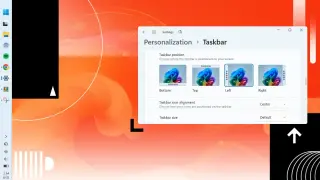
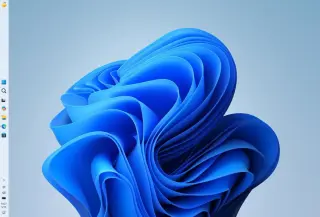
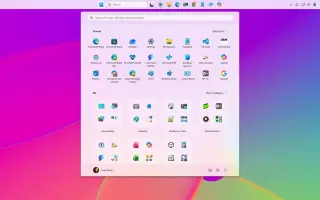
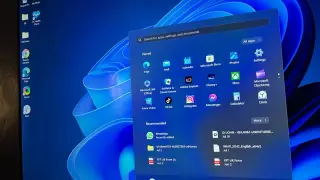
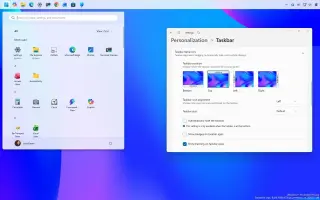
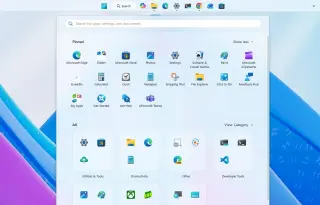
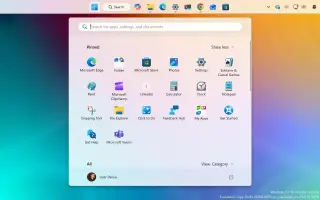
Microsoft’s Windows 11 26H2 update arriving this fall focuses on practical tweaks to Start, Taskbar, and Search: you can finally move the Taskbar to any edge (top, bottom, left, or right) with layout adjustments for each position, plus a smaller Taskbar option; the Start menu gains preset sizes, lets you toggle visibility of Pinned/Recent/All, and lets you separate file recommendations from system recommendations, plus a new screen-sharing privacy option to hide account details; Windows Search gets a redesigned home, more precise results that prioritize local content, new controls to turn off web and Store results, improved misspelling handling, and a taller search box. The changes are part of ongoing monthly updates rather than a full redesign, and some features may appear in 25H2 as they’re rolled out.
Microsoft is reportedly making Windows 11's Start menu and Taskbar search box 4 pixels taller, creating a chunkier look to align with the upcoming Ask Copilot UI. The change appeared in a Windows 11 preview build changelog and was confirmed by a Microsoft engineer, though it's not yet being previewed publicly; insiders are expected to see it first before a general rollout.
Microsoft’s Windows 11 version 26H2 is arriving as a small enablement package in the second half of 2026. In the Windows Insider Experimental channel it adds seven practical features intended to give users more control and smoother daily use: an optional Ask Copilot integrated into Search, a more customizable Taskbar, a redesigned Start menu with flexible sizing and layout, the option to disable web results in Windows Search, expanded Windows Update controls (calendar-based pause and reduced reboots), Administrator Protection to harden elevated tasks with Windows Hello, and a modern, optional Run dialog with a broader, recent-commands view. These changes roll out gradually and become part of the supported release once enabled.
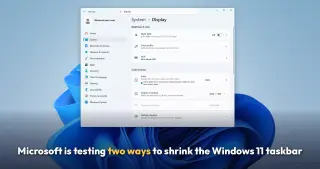
Microsoft is testing two methods to resize the Windows 11 taskbar: a new taskbar-size setting that reduces the entire bar (and scales icons) and the existing option to shrink only the icons, effectively giving users more control than Windows 10. The article notes these changes accompany other upcoming tweaks like a movable taskbar, Start menu size options, and efforts to remove ads from Start.
Microsoft's Windows 11 KB5089549 patch is designed to fix taskbar freezing and blank desktop issues by improving explorer.exe reliability and startup performance, but some users can't install it due to error 0x800f0922; on systems where it installs, users report smoother log-in, faster app launches, and a more responsive taskbar.
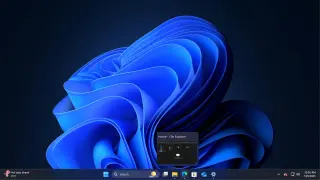
Windows 11’s 25H2 preview (build 26300.8493) brings back taskbar repositioning on any screen edge and a 'show smaller taskbar' resize option, but the experience isn’t as flexible as Windows 10: you must adjust settings instead of dragging the bar, auto-hide is still buggy, vertical layouts show quirks like a shortened year and no seconds, and multi‑row taskbars remain missing.
Microsoft's May 2026 Update for Windows 11 (KB5089549) patches reliability issues in explorer.exe that caused taskbar freezes, unresponsive right-clicks, sign-in delays, and non-responsive Task View, and also improves startup-app launch timing and system-tray performance; changes may not show up for all devices immediately.
Microsoft’s May 2026 Windows 11 Insider builds roll out 13 practical, quality‑of‑life changes that fix long‑standing friction and steer the OS through 2026: Taskbar repositioning returns; Run dialog gets a modern look; File Explorer and Search get local‑first improvements; Widgets become quieter and more adaptive; touchpad gestures, NPU‑aware Task Manager, Voice Typing on the touch keyboard, and a Windows Update overhaul add user control; K‑12 Pro Education upgrades are free; and Shared Audio enables two devices to listen to the same audio.
Microsoft is rolling out an Insider Preview (Build 26300.8493) that reinstates a resizable taskbar and configurable Start menu on Windows 11, letting users move the taskbar to the top or sides, enable smaller icons, and tailor Start menu content and size, while maintaining a list of recently installed apps; the company also teases a modern Run dialog and broader performance and UX improvements.
Microsoft is rolling out full Windows 11 taskbar and Start Menu customization to Windows Insider participants in the Experimental channel, allowing the Taskbar to be moved to top, bottom, left, or right with per-position alignment and smaller icons, plus a revamped Start Menu with adjustable sizes and toggleable sections (Pinned, Recent, All) and privacy options. Start’s file recommendations are now separated from File Explorer’s recent items, and the Recent area is renamed from Recommended. The updates are set to reach 24H2/25H2/26H1 users in coming weeks.
Microsoft says personalization is in Windows’ DNA and will roll out a wave of Windows 11 customization features this year, starting with a movable, smaller taskbar for Windows Insider testers (with a public rollout after bug fixes) and a highly configurable Start menu that can change size, hide sections (All apps, Recommended/Recent, Pinned), rename Suggested items to Recent, and show recently installed apps. Additional changes, such as a future taskbar resize, are planned throughout the year as Microsoft seeks to win back Windows users by focusing on fundamentals and customization.
Microsoft’s Windows 11 Insider Build 26300.8493 in the Experimental channel adds back a movable Taskbar that can be placed on any screen edge (bottom, top, left, or right) and introduces a smaller taskbar option for more screen space. The update also includes Widgets badge color updates, tweaks to the Windows Search Box, and general UI refinements. Some features remain in progress (auto-hidden taskbar, touch gestures for alternate Taskbar locations), with improvements documented in the changelog and user feedback requested via the Insider program. Settings for these changes live under Settings > Personalization > Taskbar > Taskbar Behaviors.