
Tag

Kb5083769

All articles tagged with #kb5083769

technology25 days ago

Windows 11 Update Breaks Third-Party Backup Apps (KB5083769)

Windows 11's April security update KB5083769 is causing widespread failures for major third-party backup programs (Acronis Cyber Protect Cloud, Macrium Reflect, NinjaOne Backup, UrBackup Server) due to a bug in the Volume Shadow Copy Service, leading to backup failures and BitLocker lockouts; Microsoft has not provided a fix yet, and users are advised to uninstall the update to restore backup functionality until a patch is released.

Windows 11 KB Update Triggers Backup Failures Due to VSS Timeouts
technology26 days ago

Windows 11 KB Update Triggers Backup Failures Due to VSS Timeouts

The April 2026 KB5083769 security update for Windows 11 24H2/25H2 breaks several third‑party backup apps that rely on Volume Shadow Copy Service (VSS), causing backup operations to fail with a VSS timeout; affected vendors include Acronis, Macrium, NinjaOne Backup, and UrBackup. Acronis confirms the impact on Windows 11 Pro/Home and recommends uninstalling the update and pausing updates as a workaround. Microsoft also issued out‑of‑band fixes for related server issues earlier in the month, and some Windows Server 2025 devices may receive BitLocker recovery prompts after KB5082063.

Windows 11 April 2026 patch may trigger BitLocker recovery at boot, with fixes available
technology1 month ago

Windows 11 April 2026 patch may trigger BitLocker recovery at boot, with fixes available

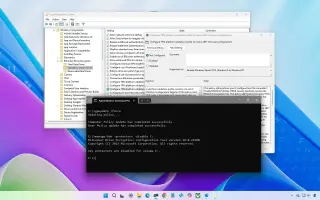
Microsoft’s April 2026 Windows 11 security update KB5083769 can cause a BitLocker recovery prompt on first restart for a small subset of devices with a specific TPM/PCR7/Secure Boot configuration. It is not widespread. If you hit it, enter the BitLocker recovery key to boot, then undo the “unrecommended” TPM validation by setting the policy Configure TPM platform validation profile for native UEFI firmware configurations to Not Configured and running gpupdate /force; you can also temporarily disable and re-enable BitLocker on the OS drive to rebind to the default PCR profile. Enterprises can use Known Issue Rollback if needed. Future restarts should proceed normally after the recovery.