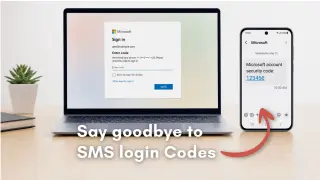
Microsoft is retiring native SMS and voice authentication for Microsoft Entra ID workforce tenants, with a hard cutoff on February 1, 2027. Passkeys are now the default authentication method, and users without alternative methods will face mandatory registration prompts to avoid sign-in lockouts.
Microsoft warns that extortion-linked groups are using passkey- and SSO-themed social engineering (AiTM and device-code phishing) to compromise Microsoft 365 accounts, perform reconnaissance with Microsoft Graph, and exfiltrate data from SharePoint Online and OneDrive over hours to days, often registering convincing phishing domains and adding attacker-controlled authentication methods; defenders should deploy phishing-resistant MFA, revoke sessions, reset credentials, remove attacker-added methods, and restrict sensitive cloud resources to managed devices.
A Pass-ta-key–style attack on Windows’ Google Password Manager shows passkeys aren’t universally bound to hardware; while other platforms store keys locally, Windows often uses cloud‑based encrypted blobs, allowing malware on a compromised PC to exfiltrate keys and trigger syncing to the infected device. The underlying design of FIDO2 does not require TPM storage, and the key takeaway is that passkeys reduce phishing but do not protect against a device already under attacker control.
Three independent groups revealed passkey-related attack vectors that don’t break cryptography: exploiting exposed Windows-stored signed data to impersonate privileged users via Entra ID, compromising Google Password Manager’s synced passkeys in Chrome to recover private keys, and abusing a compromised Windows session to use a Windows Hello for Business key for new WebAuthn assertions. Impacts vary, with mitigations including CVE-2026-34348 fixes, enforcing user-verification for WebAuthn, and strengthened endpoint/zero-trust protections; no single fix exists since issues lie in surrounding controls, not math.
Security researchers from Unit 42 disclosed three TPM-based attacks—Pass-ta-key, Silver Pass-ta-key, and Golden Pass-ta-key—targeting Google Password Manager’s synced passkeys on Windows; the exploits don’t break cryptography but abuse Chrome’s device identity, onboarding, and recovery flows to hijack or recover passkeys. Pass-ta-key impersonates a trusted device to obtain an authentication assertion, though some services verify user verification flags (GitHub blocked it; eBay failed but has since been addressed). Silver Pass-ta-key enables attacker-controlled verification keys during re-registration, letting attackers authenticate from a separate system. Golden Pass-ta-key captures the master key (security domain secret) used to encrypt synced passkeys from memory during re-registration, enabling decryption of passkeys and impersonation across accounts, with no current rotation or revocation. The researchers urge stronger verification, safer recovery/re-registration, and memory-protection of the master key.
Unit 42 details three post-compromise attack paths—Pass-ta-key, Silver Pass-ta-key, and Golden Pass-ta-key—that let malware on Windows abuse Chrome's Google Password Manager to sign into passkey-protected accounts, re-enroll devices, or extract the 32-byte Security Domain Secret from memory. The flaws do not break cryptography but target how Chrome stores device keys, re-enrolls devices, and checks user verification. No CVEs are listed and there are no confirmed exploits in the wild as of Aug 3, 2026. Mitigations include requiring userVerification, attesting newly enrolled keys, strengthening re-registration/recovery checks, restricting local passkey state access, and avoiding logging sensitive data. It’s unclear if SDS rotation or revocation is possible with current fixes.
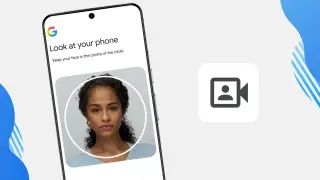
Google adds a selfie-video sign-in as a new backup method for account recovery, using live-face verification (real-time movements) to confirm it’s you. The initial setup video is encrypted and stored with user consent (and can be deleted later), and eligible accounts can enable the feature via g.co/signin-selfie, complementing existing passkeys and recovery contacts.
Microsoft will make passkeys the default authentication method for Entra ID starting September 2026, auto-enabling them for users currently on SMS/voice MFA; SMS/voice authentication will be retired across all tenants on February 1, 2027. Users already using passkeys, Windows Hello for Business, FIDO2 keys, or other phishing-resistant methods can continue. After rollout, organizations should ensure all users adopt phishing-resistant methods to avoid sign-in disruptions, with third-party telecom providers available via the Security Store if needed. Microsoft cites AI-enabled phishing risks and says passkeys reduce credential theft by replacing phishable factors.
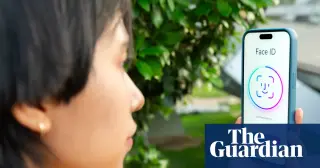
A Guardian reader questions whether passkeys (which can be a PIN or biometrics on a smartphone) are truly safer than traditional passwords, given risks of phone theft or loss. While passkeys align with phishing resistance and stay device-bound, questions remain about real-world scenarios when a phone is compromised. The piece notes that the UK National Cyber Security Centre and others promote passkeys and invites readers to share experiences to better understand their practicality.
Microsoft is phasing out SMS-based two-factor authentication for personal Microsoft accounts in favor of passwordless options like passkeys and verified email, citing SMS vulnerabilities to fraud; users can set up a passkey through Advanced Security Options (Face, Fingerprint, PIN, or Security Key) and store it on a device, though passkeys can be less convenient on new or temporary devices. No firm date for a full rollout was given, and SMS may remain as a fallback via verified email until then.
Microsoft will retire SMS-based authentication for personal accounts and push passwordless sign-ins using passkeys, with verified secondary emails for account recovery. The new flow offers on-device passkeys that can be stored in password managers, smartphones, or Windows Hello biometrics, aiming to curb phishing and SIM-swapping. While sign-in could be faster and more secure, users accustomed to SMS verification may face friction during the transition.
Microsoft will stop using SMS verification for personal Microsoft accounts, phasing out SMS as a method for two-factor authentication and account recovery in favor of passwordless options like passkeys, authenticator apps, and verified backup emails. Microsoft argues SMS is insecure and a frequent fraud vector (including SIM-swaps), and promotes passkeys that rely on device biometrics and hardware-backed keys. The transition is cross-device compatible but may cause friction for power users and scenarios like virtual machines where a hardware-based sign-in isn’t available.
Microsoft is rolling out Entra passkeys on Windows to enable phishing-resistant, passwordless sign-in via Windows Hello. The opt-in public preview runs mid-March to late April 2026 for worldwide tenants (government-cloud timelines differ) and extends passwordless sign-in to unmanaged Windows devices. Passkeys are device-bound and per-account (no cross-device syncing), with multiple accounts able to coexist on one machine; each Entra account must register its own passkey. Admins must enable Passkeys (FIDO2) in Entra, create a Windows Hello profile with required AAGUIDs, and assign it to groups.
Bitwarden now supports Windows 11 sign-ins using passkeys stored in its vault, enabling phishing-resistant, passwordless authentication across all plans (including free). Users enable Entra ID FIDO2 sign-in, register a Bitwarden-stored passkey, and log in by scanning a QR code with a mobile device. The passkey is stored in the Bitwarden vault and synced across devices, improving recovery options and reducing exposure by avoiding password transmission.
The article argues that enterprises should migrate from password-based authentication to passkeys (FIDO2/WebAuthn) to strengthen security and stay compliant with ISO/IEC 27001, detailing how passkeys work, which controls they map to, practical migration steps, risk considerations (device loss, downgrade attacks), and best practices for phased rollout and documentation, with Passwork offering migration support.