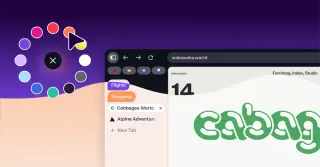
Lifehacker explains how vertical tabs free up header space and improve tab visibility, with step-by-step instructions to enable them in Chrome, Firefox, Edge, and Zen Browser, plus compact mode and tab-group tips.
Firefox 149 adds a free built-in browser VPN that routes only Firefox traffic through a secure proxy, offers 50GB per month per Mozilla account, supports per-site activation, notifies you as you near the limit, and is rolling out in the U.S., U.K., Germany, and France alongside other updates and security fixes.
Firefox 149 brings several improvements, including faster PDF handling and a move to a memory-safe JPEG-XL decoder (jxl-rs), though this JPEG-XL change is currently kept to nightly builds and not in the stable release. On Linux, Firefox now defaults to the XDG portal file picker (with GTK3 fallback); users can download images from PDFs via the context menu, and HTTP/3 uploads are more robust. The release also features updated error pages, new developer APIs, and a built-in free VPN offering up to 50 GB per month. Binaries are available from Mozilla’s FTP site.
Mozilla’s Firefox 149 will include a free built-in VPN (50 GB/month in the US, France, Germany and the UK) starting March 24, plus two new features—Split View and Tab Notes—while also introducing a new mascot named Kit, all as part of Mozilla’s push for privacy and open web standards.
Mozilla will roll out a free, built-in browser VPN with Firefox 149, starting March 24, 2026, routing only browser traffic through a proxy to mask IPs with 50GB/month in the US, France, Germany, and the UK; it is browser-only, phased in-region, and Mozilla has not disclosed the provider, aligning with its privacy-first stance.
Anthropic’s Claude Opus 4.6 reportedly scanned Firefox for bugs, finding over 100 issues in two weeks, including 14 high-severity flaws. Mozilla validated and fixed many of these findings and expanded collaboration to apply the approach across more of the browser codebase, highlighting AI-assisted security analysis as a powerful addition to traditional fuzzing and static analysis.
Anthropic’s Claude Opus 4.6 identified 22 Firefox vulnerabilities (14 high, 7 moderate, 1 low) during a two-week security review with Mozilla, with most fixes shipped in Firefox 148. The AI scanned about 6,000 C++ files, produced 112 reports, and in testing could automatically develop crude exploits for two issues (including CVE-2026-2796, a JIT miscompilation in WebAssembly), though only in sandbox-stripped environments; a task verifier helped determine exploit viability. Mozilla says AI-assisted analysis uncovered roughly 90 additional bugs and underscored AI as a powerful complement to security engineering, while noting patches remain under active refinement.
A Mozilla thread discusses a claim that up to about 10% of Firefox crashes are due to hardware memory bit flips, based on crash telemetry and post-crash memory testing. The discussion spans potential causes (overclocking, overheating, weak power supplies, Rowhammer, Dell hardware quality) and mitigations (ECC RAM, redundancy, watchdogs), with many commenters skeptical of the 10% figure and noting that software bugs still dominate Firefox crash reports. The topic highlights how hardware faults can influence software stability, but consensus on the exact share remains elusive.
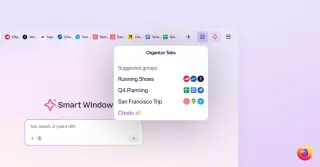
Mozilla's Firefox 148 introduces centralized AI controls, including a 'Block AI enhancements' kill switch that can disable all AI features across the browser—covering translation, PDF alt-text generation, AI-driven tab grouping, link previews, and the built-in AI chatbot sidebar—emphasizing privacy and security with Nightly early access for enterprise testing.
Mozilla will add an AI controls panel in Firefox 148 featuring a 'Block AI enhancements' toggle that lets users block all current and future AI features or selectively enable five tools (translations, image alt text for PDFs, AI‑assisted tab naming, link previews, and a chatbot sidebar). The controls begin in Nightly on Feb 24 and roll out to all desktop users later in February, reflecting Mozilla’s emphasis on user choice and persistence of preferences across updates.
Mozilla says Firefox 148, rolling out Feb. 24, will add per-feature AI controls (translations, PDF alt text, AI-powered tab grouping, link previews, and the AI chatbot in the sidebar) plus a global Block AI Enhancements toggle, allowing users to disable all current and future AI features or choose which to use.
Firefox will add an AI controls switch in its February 24 update to disable or enable individual AI features—such as the built-in chatbot, translations, AI-powered tab group suggestions, and more—giving users choice and control over AI in the browser (including AI-generated image alt text and link-preview summaries).
Security researchers warn that 22 malicious browser extensions, hiding GhostPoster malware in their logos, have infected over 840,000 users across Chrome, Firefox and Edge since 2020. The extensions spy on activity, inject backdoor scripts, and redirect to fraudulent sites, with potential to install more malware. Mozilla and Microsoft removed the extensions, but affected users must uninstall them manually to stop further damage.
Mozilla's Firefox plans to include an option to disable all AI features, dubbed the 'AI kill switch,' in response to user backlash against AI integration in browsers. Despite assurances of user control, concerns remain about the true opt-in nature of AI features, with some users skeptical about Mozilla's commitment to user choice. Meanwhile, competitors like Vivaldi emphasize maintaining user autonomy and privacy, rejecting passive AI integration.
Mozilla's new CEO plans to integrate AI features into Firefox, but due to community backlash, a 'kill switch' will be added by 2026 to disable AI functionalities, reflecting ongoing tensions between innovation and user trust.