Apple's iOS 27 adds major AirPods Pro 3 upgrades—Custom EQ for personalized sound, Siri AI with broader knowledge and more natural dialogue, and GymKit workout-data sharing—plus Find My improvements and a revamped AirPods settings interface; unlocking these features requires both iOS 27 and a firmware update (beta firmware may be needed for some features).
Apple says iOS 27, iPadOS 27, macOS 27, visionOS 27 and tvOS 27 will mark end-of-software-support for a range of older devices in 2026, though security updates may continue for years. iPhones on iOS 26 can upgrade to iOS 27 (including models back to iPhone 11), but older iPhones won’t get all of iOS 27’s features. The devices hitting end of life with these releases include iPad Air 3rd gen, iPad Pro 11" (1st gen), iPad Pro 12.9" (3rd gen), iPad (8th gen), iPad mini (5th gen); Apple Watch Series 6/7/8, Ultra, SE; MacBook Pro 16" (2019), MacBook Pro 13" (2020, four Thunderbolt 3 ports), iMac (2020), Mac Pro (2019); and Apple TV HD/4K. Even after end-of-feature updates, Apple will continue to push some security patches for years, so upgrading or limiting usage to offline tasks is advised once a device loses active support.
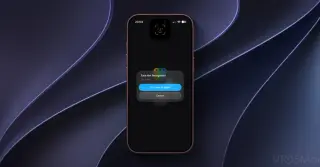
Apple may add a “Reference Image” photo-authentication feature in iOS 27 to verify a photo’s iPhone origin by sending sensor data and metadata to a Private Cloud Compute for verification, with a new Reference mode enabling this option in camera settings. Seen in beta analyses by 9to5Mac, the tool could help prove provenance amid AI-generated imagery and would complement existing watermarking efforts from Apple and Google, though it may not be included in the public rollout this fall.
Apple released iOS 27 beta 5 for developer testers, introducing Siri AI and Apple Intelligence enhancements along with UI refinements such as updated icons for Safari, Siri, Remote, and Preview and improvements to Liquid Glass visuals. Siri’s voice gains British English support. A new “Before Search” section in Search Settings lets users toggle app suggestions, shortcuts, and recent searches, affecting Home Screen Search. The update supports iPhone 11 and newer, plus iPhone SE 2 and newer, and is installed via Settings > General > Software Update; Apple plans further beta testing through August with a September public release alongside the new iPhone lineup.
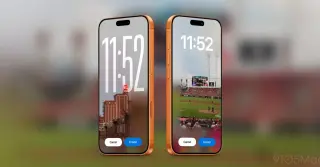
iOS 27 introduces four new Lock Screen customization options: Extend uses AI to add content around image edges so wallpapers fit better; Image Playground lets you generate wallpapers from photos or natural language prompts; you can move the clock to the top area to reveal more of your wallpaper; and you can swipe away the Now Playing widget while music continues playing. These features are initially available to developers and public beta testers, with a full public release planned later this year.
Apple's iOS 27 Beta 5 lands with a redesigned Find My, Spotlight search upgrades, and a Siri visual refresh, plus measurable battery life and performance gains. The beta schedule shifts from bi-weekly to weekly, with Beta 5 today (Aug 3), Beta 6 on Aug 10, Beta 7 on Aug 17, Beta 8 on Aug 24, and a Release Candidate around Sept 7–8 ahead of the public iOS 27 launch around Sept 14.
iOS 27 adds a redesigned AirPods settings page and a customizable EQ for AirPods Pro models, plus Personalized Volume, Conversation Awareness, Hearing Health tools, battery insights, and Find My improvements for a more personalized and accessible listening experience.
Apple releases iOS 26.6 for iPhone, delivering bug fixes, security updates (over 75 fixes), and Spotlight index optimization to prep for iOS 27, along with a new Blocked Contacts Limit Reached alert and notes that an anti-snatching feature is in development; installation is via Settings → General → Software Update.
Apple's iOS 26.6 RC adds bug fixes and optimizes Spotlight indexing to prepare for iOS 27, with a small new alert for blocking too many contacts and hints of an anti-snatching feature; a full public release is expected within about two weeks as Apple shifts focus to iOS 27.
Apple’s iOS 26.6 RC release notes reveal that Spotlight indexing will be optimized in advance to prepare for iOS 27, aiming to reduce long indexing times at launch. If you install 26.6, your iPhone may run indexing in the background to ensure a smoother iOS 27 experience.
iOS 27 introduces AI-driven features and major UI refinements building on iOS 26, including a Siri-like AI experience, expanded lock-screen customization, a refined liquid glass design, larger widgets, a redesigned camera app with new editing tools, easier Shortcuts automation, and broad performance boosts (faster app launches, faster AirDrop, and quicker photo loading) that also benefit older devices.
The iOS 27 public beta adds CarPlay improvements such as Siri AI for voice-driven context-based queries and routing, a persistent Now Playing mini‑player with an audio scrubber, new wallpapers, and stability boosts for navigation, GPS accuracy, and wireless CarPlay, plus an upcoming option for dedicated video apps in cars once automakers support it.
iOS 27’s public beta introduces a slew of non‑AI improvements: smoother AutoMix transitions in Music, iCloud Shared Albums with full‑resolution sharing, independent alarm volume in Settings, a new extra‑large Home Screen widget with full‑screen options for Music/Photos/Weather/Calendar, the ability to dismiss the Now Playing widget on the Lock Screen, moving the clock to the top area of the Lock Screen, saving a video frame as a photo, a redesigned Apple Pay checkout flow, expanded landscape support across more apps, a refreshed Find My design with richer location details, a clipboard paste shortcut above the next keyboard, and a CarPlay audio scrubber for quick scrubbing in cars.
Apple has released the iOS 27 public beta (with iPadOS 27 for compatible iPads). The piece guides readers through device compatibility, backing up before installation, and the steps to join Apple’s Free Beta Software Program and install the beta via Settings > Software Update. It also highlights new features like a more capable Siri, AI-powered improvements across Maps, Reminders, Calendar, Wallet/Apple Pay, and Find My, plus other app updates. A cautionary note reminds users that beta software can be buggy, so it’s best to use a secondary device and ensure a full backup to revert if needed.
iOS 27 public beta introduces Siri AI, a revamped chatbot-style assistant deeply woven into the iPhone and its ecosystem, with on‑device indexing for contextual answers, an integrated chat app, and features like Write with Siri; available on iPhone 15 Pro and newer via Apple’s Beta Software Program, with ongoing improvements and configurable chat retention. Early hands-on feedback is generally positive, though some capabilities (like memory of user preferences) are still evolving.