Tag

Safe Browsing

All articles tagged with #safe browsing

Chrome Enhances Scam Defense with AI-Driven Warnings and ClickFix Detection
technology1 month ago

Chrome Enhances Scam Defense with AI-Driven Warnings and ClickFix Detection

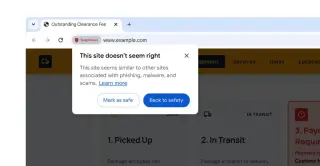
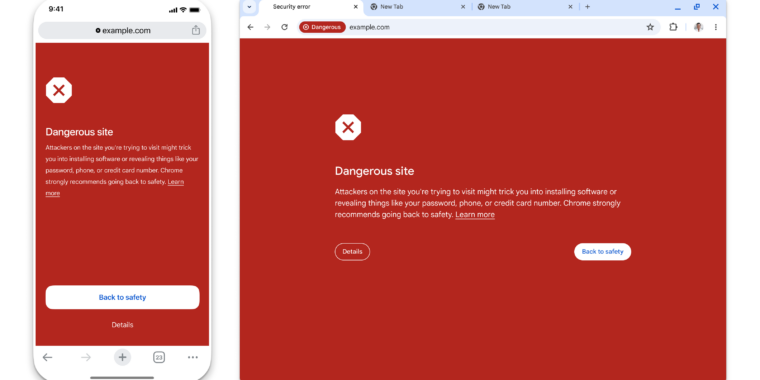
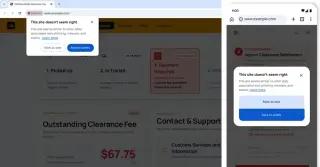
Google has expanded Chrome’s Enhanced Protection mode with new safeguards against evolving web threats. The update introduces a two-tier warning system that distinguishes between 'suspicious' sites, which trigger small pop-ups, and 'dangerous' sites, which display full-screen blocks. Additionally, Chrome now uses server-side Gemini AI to analyze page content for scam indicators and detects 'ClickFix' social engineering attacks by monitoring clipboard activity for malicious commands. These features are available to users who enable Enhanced Protection, which requires sharing browsing data with Google.

Chrome Shifts to Server-Side Gemini for Enhanced Scam and ClickFix Defense
technology1 month ago

Chrome Shifts to Server-Side Gemini for Enhanced Scam and ClickFix Defense

Google has upgraded Chrome’s Enhanced Protection mode with server-side Gemini analysis to detect scams and ClickFix attacks. The update introduces a two-tier warning system for suspicious versus dangerous sites and scrubs clipboard data to prevent malicious command execution. These features are available only to users who opt into Enhanced Protection, which requires sharing additional browsing data with Google.

Chrome Deploys ClickFix Clipboard Scrubbing and Financial Ad Verification
technology1 month ago

Chrome Deploys ClickFix Clipboard Scrubbing and Financial Ad Verification

Google is rolling out new safeguards in Chrome’s Enhanced Protection mode to counter ClickFix attacks, which trick users into pasting malicious commands into system terminals. The update scrubs clipboard data for analysis, introduces a two-tier warning system for suspicious versus dangerous sites, and expands financial ad verification in the U.S. and Canada. Apple simultaneously announced Safari updates blocking identity resolution tracking.

Chrome introduces two-tier warnings to distinguish suspicious from dangerous sites
technology1 month ago

Chrome introduces two-tier warnings to distinguish suspicious from dangerous sites

Google has updated Chrome’s Enhanced Protection mode to include a new two-tier warning system for websites. This update distinguishes between 'suspicious' sites, which carry a lower confidence risk and allow users to proceed if they are certain the site is safe, and 'dangerous' sites, which trigger a full-screen block. The change aims to reduce false positives while maintaining strict protection against high-risk malware and phishing attempts.

Google Enhances Chrome Security with Real-Time URL Scanner and Password Security Surprise
technology2 years ago

Google Enhances Chrome Security with Real-Time URL Scanner and Password Security Surprise

Google Chrome's "Safe Browsing" feature is getting real-time updates for all users, using privacy-preserving URL protection to prevent it from accessing users' entire browsing history. The feature involves real-time checking against a remote server, with a third-party relay server operated by Fastly to preserve user privacy. While this may cause some latency, Google is working on introducing an asynchronous mechanism to improve the user experience. The new feature is available in the latest Chrome release for desktop, Android, and iOS, and can be turned off in the "Privacy and security" section of the Chrome settings.

"Google Boosts Chrome Privacy with Enhanced Real-Time URL Protection"
browser-security2 years ago

"Google Boosts Chrome Privacy with Enhanced Real-Time URL Protection"

Google has introduced an enhanced version of Safe Browsing for Chrome users, providing real-time URL protection to prevent visits to potentially malicious sites. The new protection mode will check sites against Google's server-side list of known bad sites in real-time, aiming to block 25% more phishing attempts. This change comes as the list of harmful websites is growing rapidly, with many phishing domains existing for less than 10 minutes, making them difficult to block. The new architecture involves real-time checks using obfuscated URL hashes and a privacy server to prevent access to users' IP addresses, ensuring browsing activity remains private.

"Google Enhances Chrome's Real-Time URL Protection for Improved Privacy and Security"
technology2 years ago

"Google Enhances Chrome's Real-Time URL Protection for Improved Privacy and Security"

Google has updated its Safe Browsing feature in Chrome to work in real time by checking URLs against a server-side list without sharing browsing habits with Google. This change aims to catch up to 25% more phishing attacks and reduce strain on low-end machines and low-bandwidth connections. The new system uses a privacy server to obfuscate and encrypt URL data before sending it to the Safe Browsing server, ensuring that neither Google nor Fastly, the partner company providing the privacy server, can see users' browsing data.

"Google Chrome Enhances Real-Time Protection and Privacy Features for Safer Browsing"
technology2 years ago

"Google Chrome Enhances Real-Time Protection and Privacy Features for Safer Browsing"

Google is enhancing the default Safe Browsing mode in Chrome to provide real-time protection against malicious websites by incorporating real-time checks from the Enhanced protection mode. This update aims to block 25% more phishing attempts and is available on the latest desktop and iOS versions of Chrome, with an Android update coming later. The company emphasizes privacy, stating that Safe Browsing doesn't share visited site URLs with Google and uses hashing and encryption for user protection. Additionally, Chrome's Password Checkup feature on iOS now warns about weak and reused credentials in addition to compromised passwords.

"Google Chrome Enhances Real-Time Privacy and Security Features"
technology2 years ago

"Google Chrome Enhances Real-Time Privacy and Security Features"

Google has introduced real-time browsing protection to Chrome's Safe Browsing feature, claiming to enhance privacy by hiding visited URLs. The new Standard mode now offers real-time checking, utilizing an API to conceal URLs from Google and sending encrypted versions to a privacy server before cross-referencing with Safe Browsing's database. This process aims to maintain user privacy while improving phishing protection, with the feature currently available on Chrome for desktop and iOS, and set to roll out to Android later this month.

"Google Chrome Enhances Real-Time Safe Browsing Protection for Mac, iOS"
technology2 years ago

"Google Chrome Enhances Real-Time Safe Browsing Protection for Mac, iOS"

Google is upgrading Google Safe Browsing in Chrome with real-time URL protection to block phishing attempts and protect against malicious websites. The upgrade uses a server-side list of known bad sites and an Oblivious HTTP privacy server to preserve user privacy. Chrome users can opt for Enhanced Protection, which uses AI to block attacks and protect against malicious Chrome extensions. Additionally, Password Checkup on iOS now flags weak and reused passwords.

"Google's Enhanced Android Safe Browsing for Galaxy and Pixel Devices Boosts Online Security"
technology2 years ago

"Google's Enhanced Android Safe Browsing for Galaxy and Pixel Devices Boosts Online Security"

Google is introducing new security features for Android users, including Android Safe Browsing and Live Threat Detection, to protect against harmful websites and links. These features, part of the Google Play Services app, aim to prevent malware and phishing attempts by scanning links and websites for threats and warning users when encountering unsafe content. Users can enable these features through the device's settings after installing the latest Google Play Services update.

"Secure Your Android with One Powerful Feature Against Cyberattacks"
technology3 years ago

"Secure Your Android with One Powerful Feature Against Cyberattacks"

Android's Safe Browsing feature offers protection against potential cyber threats by alerting users to malware, risky extensions, phishing scams, and unsafe websites. Users can choose between three levels of protection, with Enhanced Protection providing the highest level of security. However, turning on Enhanced Protection requires sharing data with Google. It's important to note that Safe Browsing is not a substitute for antivirus software, which provides more comprehensive protection against viruses, spyware, and other types of malware.