Microsoft has made remote PC connections generally available in the Windows App, unifying access to Windows 365, Azure Virtual Desktop, Dev Box, and traditional remote PCs. This update follows the retirement of the standalone Remote Desktop app and aims to consolidate remote access into a single cross-platform tool.
Microsoft has issued an out-of-band Windows 11 emergency update KB5129195 to address issues from the September 2026 update, upgrading 25H2 to build 26200.9457 and 24H2 to 26100.9457; the patch is auto-downloaded and typically needs a reboot (more if Secure Boot/firmware updates are involved). It adds a fix for CVE-2026-62721 affecting UMPS, resolves Remote Desktop Services instability caused by the September update, and patches some multichannel audio issues. It also fixes a Claude Cowork storage-related bug. However, it does not fix ongoing AMD Radeon GPU errors reported after the September update, nor Explorer.exe crashes or File History problems. The article notes a broader surge in security fixes in 2026, possibly aided by AI, and questions why stability hasn't improved despite the patches.
Microsoft’s September 2026 Windows 11 patch KB5124008, intended to restore several features, is breaking WSL-based apps, Remote Desktop sessions, Plan9/Hyper-V file sharing, File History backups, and Explorer.exe stability on some PCs, with AMD GPU issues reported as well. Microsoft is investigating, and users are urged to install security updates promptly rather than delaying them, despite the new bugs.
Microsoft fixed a bug that caused the new Remote Desktop security warning dialog to render incorrectly on multi‑monitor setups after the April 2026 updates; the fix is in the optional Windows 11 KB5083631 preview (with 34 other changes). The issue affected Windows 11/10/Server and could make the warning dialog’s buttons unreadable or non‑interactive; it aligns with the standard RDP warning flow shown when opening preconfigured .rdp files. Separately, KB5083769 caused a VSS timeout that affected some backup apps on Windows 11 24H2/25H2, prompting out‑of‑band server fixes after the April updates.
Microsoft warns of a bug where the new security warnings shown when opening Remote Desktop (RDP) files can render with unreadable text and misaligned buttons when multiple monitors use different display scaling, affecting Windows 11/10/Server after the April 2026 updates. The prompt appears before connecting and shows signer status and resource redirections; the issue follows increased attacker use of RDP in phishing campaigns (e.g., APT29).
Microsoft’s April 2026 updates for Windows 10 and Windows 11 add protections to curb phishing by malicious Remote Desktop (.rdp) files: first-open triggers educate users, and subsequent attempts show a security dialog listing the file’s publisher status, remote address, and local resource redirects with all options off by default. If unsigned, a caution label appears; if signed, the publisher is shown but verification is still encouraged. These protections apply only to opening RDP files, not to connections via the Windows Remote Desktop client, and can be temporarily disabled via a registry setting by admins. Microsoft urges keeping the safeguards enabled, noting that attackers have used rogue RDP files in campaigns (e.g., APT29) to steal data, credentials, or even clipboard contents and smart-card authentication.
Security researchers flagged a fake Moltbot AI coding assistant extension for Visual Studio Code that auto-runs on launch, fetches payloads from malicious domains, and installs a remote-access backdoor (via ScreenConnect) with a DLL sideloading fallback, highlighting broader Moltbot misconfigurations and credential exposure across deployments.
Microsoft issued out-of-band patches to fix bugs introduced by the January 2026 Windows update, including Remote Desktop sign-in failures and a Secure Launch restart issue affecting Windows 11, Windows 10, and Windows Server; affected systems should install the updates via Windows Update or have IT push them in managed environments.
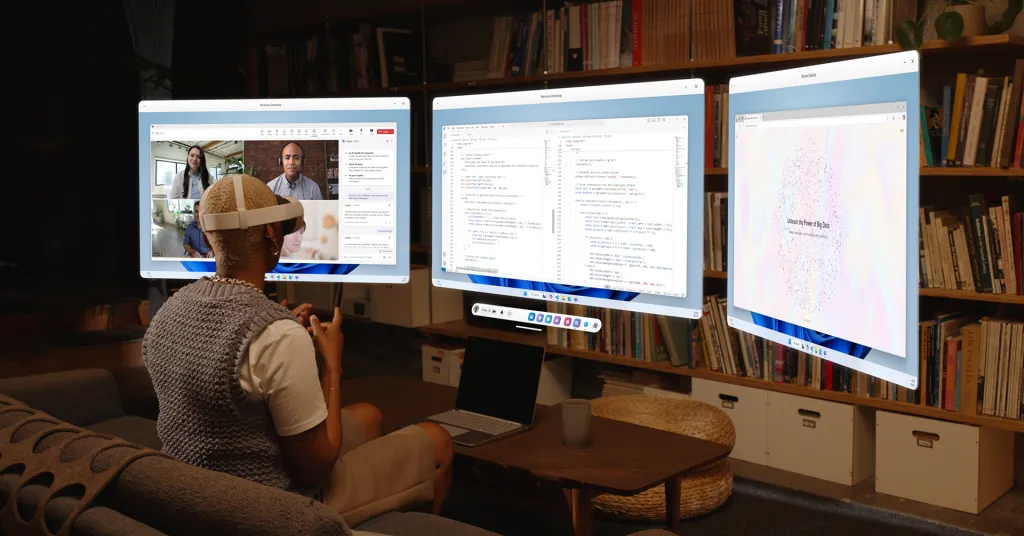
Microsoft has released its Windows 11 remote desktop feature on Meta's Quest 3 and Quest 3S headsets, allowing users to beam multiple high-resolution monitors and try an immersive ultrawide mode, similar to Apple’s Vision Pro, with additional features like resizing displays and a passthrough environment view.
Microsoft has disclosed a critical vulnerability (CVE-2024-49115) in Windows Remote Desktop Services, allowing remote code execution on affected systems. The flaw, with a CVSS score of 8.1, arises from improper memory handling and use-after-free conditions. It affects multiple Windows Server versions, including 2016, 2019, 2022, and 2025. Although no active exploits have been reported, Microsoft has released patches as part of December 2024's Patch Tuesday updates. Users are urged to install these updates immediately to mitigate risks.
Remote desktop software provider AnyDesk experienced a cyberattack that led to unauthorized access to its production systems, prompting the company to reset passwords and revoke certificates. The company's software, used by millions of IT professionals, was targeted by threat actors and ransomware gangs. AnyDesk confirmed the incident and stated that customer data was not accessed, but security researchers reported stolen account details being sold on cybercrime forums, likely sourced from previous malware infections. The company has faced criticism for its handling of the cyberattack and is working with CrowdStrike to remediate the situation.
AnyDesk, the popular remote desktop application, has confirmed a hack of their production systems and urged users to change their passwords. The company has called in cyberattack response services to investigate and remediate the compromise, and has revoked all security-related certificates and systems. While they claim the situation is under control and safe to use AnyDesk, users are advised to download the latest client software and change their web portal passwords, as well as consider adding a second authentication factor for account security.