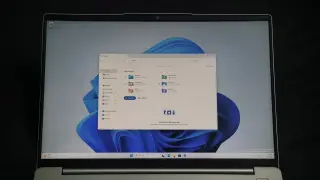
Microsoft is rolling out a new File Explorer feature in Windows 11 Insider builds that allows users to use the tilde (~) symbol to quickly access their user folder, similar to Unix systems. This update also improves search consistency, path handling, and folder preferences.
Microsoft’s August Windows 11 Insider builds introduce a fully customizable context menu with an App extensions submenu, plus personalization tweaks (better background handling and wallpaper reliability), a refreshed Magnifier, easier Camera Roll backup to OneDrive, Windows Recovery Environment networking improvements, and the removal of WMIC and the Drag Tray—marking a move toward giving users more control while continuing to modernize core OS components like File Explorer.
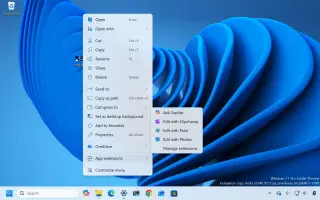
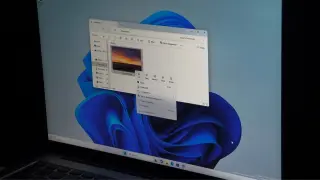
Microsoft admits Windows 11’s context menu became cluttered and sluggish and is rolling out a redesigned, faster, and highly customizable context menu via Windows Insider Experimental Build 26340.9212. The update reduces top‑level clutter, adds a “Customize menu” page to toggle built‑in actions and app extensions, lets you arrange primary actions (including a Windows 10‑style vertical layout), and retains a legacy Show more options path for compatibility. The changes aim to boost performance and control in File Explorer; rollout is gradual to Insiders before general release.
A minor change to how Windows 11's File Explorer displays file sizes has sparked a broader debate about UI updates: readers are split between embracing a more modern look and clinging to legacy behavior, underscoring the challenge Microsoft faces in pleasing billions of users. Observers suggest giving users toggle options to keep or switch off new UI elements as Windows continues to evolve.
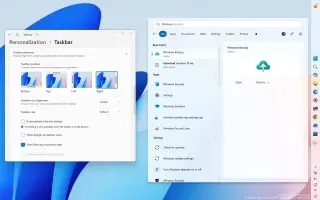
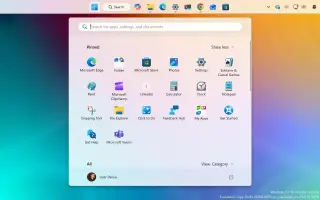
Microsoft’s July Windows 11 Insider updates introduce a slate of refinements: Windows Search now auto-discovers additional locations based on activity, Phone Link previews get easier, and adaptive hibernate policies optimize power. File Explorer gains performance boosts, Widgets get updated icons, and the overall update flow is becoming less disruptive with a unified monthly reboot. Start Menu customization, Taskbar positioning, and refreshed Account/ Narrator features also arrive, reflecting a broader push to align Insider channels ahead of a broader release. The changes are mostly incremental rather than groundbreaking, as Microsoft tightens consistency across builds.
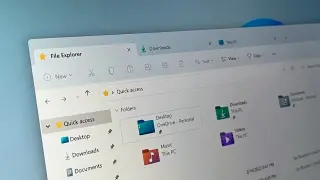
Microsoft released the KB5101684 preview cumulative update for Windows 11 24H2 and 25H2, adding 42 fixes and new features as part of the optional non-security preview. It can be installed via Settings > Windows Update or the Microsoft Update Catalog, updating 24H2 to build 26100.8973 and 25H2 to 26200.8973. Highlights include File History/DFS fixes, improved File Explorer usability (unit display and tabbed navigation), Voice Isolation for Voice Access (with Korean support), Windows Hello Enhanced Sign-in Security support for peripheral fingerprint readers, and broader reliability improvements across Start, Taskbar, Search, and Widgets; no known issues are reported.
Microsoft’s August 2026 Patch Tuesday for Windows 11 brings a broad polish pass: Windows Hello Enhanced Sign-in Security now supports external fingerprint sensors; an option to uninstall the AI-generated Image/AI model from Copilot+ PCs; plus a slate of improvements across File Explorer, Windows Search, Widgets, and Windows Update. Other updates include new touchpad gestures, better Voice Typing/Voice Access with noise isolation, a redesigned Account Control flyout, and power/battery tweaks. The update also returns the ability to set Energy Saver battery percentage and delivers more accurate update progress. These changes apply to Windows 11 versions 25H2 and 24H2 (identical) via Controlled Feature Rollout.
Microsoft’s Windows 11 Insider Experimental Preview Build 26300.8935 adds a faster delete path for large, fragmented files in File Explorer, addressing slow deletions on nearly full drives. The change, described as faster “in certain scenarios,” joins other speed improvements like a faster Home tab and better touch-scrolling, as part of ongoing File Explorer optimizations and a WinUI-based update to the Properties dialog; these updates are rolling out gradually to Insiders in the Experimental channel.
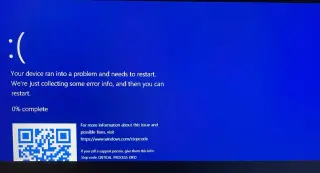
The June 2026 Windows 11 patch KB5094126, while adding features like Low Latency Profile, is causing boot failures (BSOD/BitLocker recovery) on certain PCs, especially HP models, likely due to BIOS/EFI partition size and Secure Boot certificate updates. It also breaks OneDrive (and other cloud storage) in File Explorer, disrupts Word automation in some business apps, and alters desktop.ini folder customizations. Workarounds include temporarily disabling Secure Boot, backing up BitLocker keys, booting into BIOS to disable Secure Boot, installing the update, then re-enabling Secure Boot, and ensuring BIOS/UEFI updates and sufficient EFI space. If problems persist, uninstalling KB5094126 may be necessary.
Microsoft’s May 2026 Windows 11 Insider builds roll out 13 practical, quality‑of‑life changes that fix long‑standing friction and steer the OS through 2026: Taskbar repositioning returns; Run dialog gets a modern look; File Explorer and Search get local‑first improvements; Widgets become quieter and more adaptive; touchpad gestures, NPU‑aware Task Manager, Voice Typing on the touch keyboard, and a Windows Update overhaul add user control; K‑12 Pro Education upgrades are free; and Shared Audio enables two devices to listen to the same audio.
Microsoft has released the April 2026 optional preview update KB5083631 for Windows 11 versions 24H2/25H2, delivering a broad set of under-the-hood improvements: fixes for the File Explorer white flash in dark mode and related UI quirks, modernization of legacy dialogs with WinUI 3, preserved view and sorting settings, and a more reliable explorer.exe process; memory optimizations for the Delivery Optimization service, faster startup for startup apps, and an increase of FAT32 formatting support from 32GB to 2TB via the command line. Additional reliability fixes touch the taskbar, Microsoft Store error codes, Windows Hello data persistence across upgrades, Remote Desktop scaling, color profile persistence, and input improvements. The update is currently optional and is expected to roll out to all users with the May 12, 2026 Patch Tuesday update.
Microsoft is overhauling Windows 11 to feel faster with targeted performance and memory-management tweaks, a quicker File Explorer, and a calmer Widgets experience separated from the Discover feed; the updates will roll out through the Windows Insider program, signaling a shift toward a leaner, more productive Windows 11.
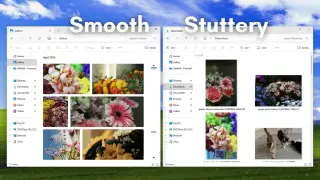
Microsoft says the Home and Gallery views of Windows 11 File Explorer were rebuilt with the WinUI 3 framework as part of the Windows App SDK (WASDK), which explains their smooth scrolling. The rest of File Explorer still runs on legacy Win32 code, causing jagged scrolling. The company plans a phased modernization, prioritizing reliability and performance for the May 2026 update before bringing smooth scrolling to all folders, while continuing to gather feedback on touch usability and maintaining existing features like type-ahead search and layout options.
Microsoft is rolling out Insider-tested File Explorer speed and reliability improvements in Windows 11, including an optional background preloading feature to speed launches, fixes to ensure explorer.exe stops cleanly after closing, and a fix for bright white flashes in dark mode. A new Xbox mode for distraction-free full-screen gaming is also available. The changes target Release Preview Insiders on Windows 11 builds 26100.8313 and 26200.8313 (KB5083631), following earlier Startup Boost efforts for Office apps.
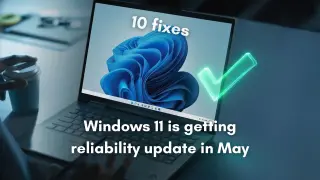
Microsoft is delivering a May 2026 reliability update for Windows 11 across Insider channels, aimed at boosting performance and stability. The release includes fixes to core components such as File Explorer and explorer.exe, the taskbar, Settings, and clipboard history; improvements to Windows Hello, storage performance, startup app memory, audio/display rendering, and security controls for drivers and batch scripts. If the preview timeline holds, these reliability tweaks should reach general users via the April optional update and the May Patch Tuesday security update.