Tag

Ui Design

All articles tagged with #ui design

GTA 6 Launch Dominates Charts Despite Backlash Over Clunky ATM Controls
technology1 day ago

GTA 6 Launch Dominates Charts Despite Backlash Over Clunky ATM Controls

Grand Theft Auto 6 has achieved massive commercial success, selling over 32 million copies and generating $3.79 billion in revenue since its November 19 release. However, players and critics are criticizing the game's banking interface. Both the in-home stash box and public ATMs in the fictional state of Leonida use a cumbersome scrolling mechanism for depositing and withdrawing cash, rather than a standard numerical keypad. This design choice frustrates users who must carefully manage funds, as losing money upon death or arrest is a core gameplay risk. While the game is praised for its vast world and emergent gameplay, the banking UI is widely considered a significant flaw that requires a patch.

Apple Tests Softer Navigation Bar Fade in iOS 27.3 Beta
technology7 days ago

Apple Tests Softer Navigation Bar Fade in iOS 27.3 Beta

Apple is testing a softer visual transition for iPhone navigation bars in the iOS 27.3 beta, aiming to restore a gradual fade effect reminiscent of iOS 26. This change, currently disabled by default, applies only when the Liquid Glass tint is set to 25 percent or lower. It replaces the sharp boundary between the navigation bar and app content with a gentler blur, potentially improving readability and aesthetic continuity.

Microsoft Confirms Windows 11 Taskbar Dragging Is a Permanent Design Choice
technology22 days ago

Microsoft Confirms Windows 11 Taskbar Dragging Is a Permanent Design Choice

Microsoft has confirmed that the inability to drag the Windows 11 taskbar to reposition it is a deliberate design decision, not a missing feature. Vice President of Design Diego Baca stated that dragging often leads to accidental movements and that users rarely change the taskbar position. While Windows 10 allowed users to unlock and drag the taskbar, Windows 11 requires users to navigate through settings to change its location. Baca emphasized that the current method is more intentional and predictable, though he acknowledged support for third-party tools that restore the dragging functionality.

Google Messages Overhauls Settings UI and Prepares to Retire Per-Contact SMS Switch
technology1 month ago

Google Messages Overhauls Settings UI and Prepares to Retire Per-Contact SMS Switch

Google is updating the Google Messages app with a cleaner settings interface and preparing to remove the per-contact SMS/MMS toggle. The new design simplifies navigation, while the removal of the switch will force users to rely on global RCS settings or automatic fallbacks. These changes follow recent expansions of AI-driven scam protections in the app.

Study: HSL Color Ramps Cause Perceptual Drift and Contrast Failures
technology1 month ago

Study: HSL Color Ramps Cause Perceptual Drift and Contrast Failures

A new study by The Chromologium argues that standard color interpolation methods in web design fail because they rely on mathematical models that do not match human perception. The research highlights that using HSL or sRGB hex codes creates uneven lightness and hue shifts, leading to accessibility issues. It recommends using OKLCH and APCA standards for more accurate color ramps.

Chromologium Launches MCP Server to Bridge Historical Materials and Modern UI Design
technology1 month ago

Chromologium Launches MCP Server to Bridge Historical Materials and Modern UI Design

The Chromologium has released a live Model Context Protocol (MCP) server that connects historical material archives with modern interface design. The system allows AI agents to query 177 mapped places, 32 material dossiers, and 20 archival pigments to generate accessible, physics-based design tokens. It supports exports for platforms including SwiftUI, Jetpack Compose, and Tailwind, ensuring that historical evidence is preserved alongside contemporary UI interpretations.

Firefox 157 Launches 'Nova' Redesign to Compete with Chrome
technology1 month ago

Firefox 157 Launches 'Nova' Redesign to Compete with Chrome

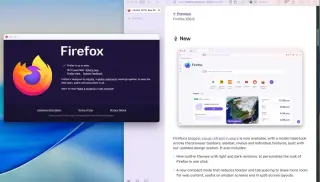
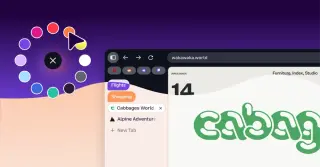
Mozilla released Firefox 157 on September 29, 2026, introducing a major visual overhaul called 'Nova' across desktop and mobile platforms. The update features rounded tabs, a unified design language, and the return of Compact Mode. Mozilla states the changes are performance-neutral and aim to modernize the browser's appearance to attract a broader audience beyond privacy-focused users. The redesign includes new theme options and vertical tabs as a first-class layout, while maintaining core privacy features and open-source independence.

Firefox 157 Rolls Out Nova Redesign to Modernize Interface and Compete with Chrome
technology1 month ago

Firefox 157 Rolls Out Nova Redesign to Modernize Interface and Compete with Chrome

Mozilla has released Firefox 157, applying a comprehensive visual redesign called Nova across desktop and mobile platforms. The update introduces rounded tabs, a refreshed color palette, and a new theme picker. It also restores Compact Mode, a feature previously removed, which reduces toolbar size to maximize screen space. Mozilla states the changes are performance-neutral and aim to modernize the browser's appearance while retaining its core privacy features and open-source independence.

Chromologium Releases Interactive Study on Japanese Material Palettes
design-and-technology2 months ago

Chromologium Releases Interactive Study on Japanese Material Palettes

The Chromologium has published Study 011, an interactive digital resource that translates traditional Japanese materials like Hinoki wood and Washi paper into a modern color palette. The study provides six specific hex codes, ranging from pale paper tones to deep shadow hues, intended for use in interface design and visual composition. It includes tools for adjusting material proportions and exporting CSS tokens, emphasizing texture and warmth over complex visual elements. The project frames these colors as 'authored interpretations' rather than calibrated physical samples, offering a bridge between cultural material references and digital application.

Chromologium argues digital wear must record actions, not just mimic age
design-and-technology3 months ago

Chromologium argues digital wear must record actions, not just mimic age

Evelyna Bellamy’s essay 'The Dignity of Wear' argues that digital interfaces should distinguish between decorative aging and functional records of user activity. Bellamy contends that simulated wear, or 'computational patina,' is only valuable if it reflects specific, inspectable actions like saving a bookmark, rather than merely mimicking physical decay. The piece proposes that useful digital memory must be legible, optional, and under user control, ensuring that visual traces do not obscure information or imply undisclosed tracking.

Chromologium argues interface resemblance must not replace functional clarity
technology3 months ago

Chromologium argues interface resemblance must not replace functional clarity

A new monograph by Evelyna Bellamy argues that attaching controls to objects in user interfaces is only useful if it clarifies the relationship between the action, the target, and the resulting state. The essay critiques the trend of 'diegetic' design, where interface elements mimic physical objects, noting that visual resemblance alone does not ensure usability or accessibility. It emphasizes that while spatial proximity can help explain an action, it must not replace standard labels, keyboard access, or clear status indicators. The piece distinguishes between game-based immersion concepts and general software productivity, warning that extending game design theories to ordinary applications requires careful validation. Ultimately, the author proposes that an interface earns its material character only when its label, focus, and state provide a consistent and understandable explanation of its function.

Windows 11 File Explorer tweaks spark debate over user control vs. consistency
technology3 months ago

Windows 11 File Explorer tweaks spark debate over user control vs. consistency

Microsoft is rolling out customizable right-click context menus and minor File Explorer display tweaks, aiming to reduce clutter while preserving legacy compatibility. While these changes address long-standing user complaints about menu bloat, they highlight the ongoing tension between modernizing the interface and maintaining backward compatibility for a diverse user base.