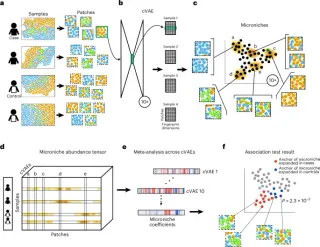
New Deep Learning Method VIMA Identifies Disease-Specific Spatial Patterns in Tissues
Researchers have introduced VIMA, a new computational method that uses deep learning to analyze spatial molecular data in tissues. By creating numerical 'fingerprints' for small tissue patches, VIMA identifies disease-associated structures without requiring manual cell segmentation or discrete clustering. Tested on rheumatoid arthritis, ulcerative colitis, and dementia datasets, the tool successfully recapitulated known biology and revealed new spatial features, outperforming existing methods in detecting case-control differences.